Icon of program: Vysor

Vysor for Windows

  • Free
  • 4.8
  • 3
  • V5.0.7
Free Download for Windows

View an ad to download for free

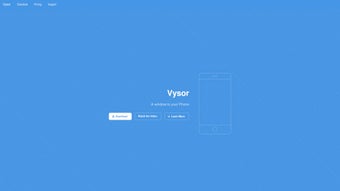
Vysor brings mobile screens and control to the Windows desktop

Vysor, from Vysor Inc., mirrors and controls mobile devices on a Windows desktop for development and hobby workflows. It displays Android and iOS screens in real time and lets you operate apps with a PC keyboard and mouse, plus capture screenshots and recordings. The app supports USB mirroring, remote sharing via Vysor Share, audio mirroring for Android, notification forwarding, and desktop recording tools. Targeted at developers, mobile gamers, and office workers who need direct device control on their PC.

What the app actually does for a daily desktop session

Vysor projects a phone or tablet screen into a desktop window, letting you navigate apps with keyboard and mouse and record or capture screenshots from the desktop. Setup uses a USB connection and Android developer mode for basic mirroring, which the developer says delivers low-latency interaction. Notification forwarding and Android audio mirroring let you keep an eye and ear on the device without switching to the handset.

How well it connects to devices and platforms

Compatibility covers Android and iOS devices and desktop clients for Windows, macOS, Linux, plus a web app. The app uses standard ADB protocols for Android and does not require root access, so physical-device testing is possible without advanced device modification. Wireless mirroring and certain high-resolution tools are gated behind an account-tier, while USB-based mirroring remains available on the free tier.

Who benefits in everyday use and where it strains

Developers gain direct hardware testing instead of relying on emulators, and mobile gamers get finer controls using a PC peripheral set. Office users can manage notifications and respond to messages from their workstation. Built-in screen recording and screenshot tools support documentation and bug reports. Some users note frustration with the account-gated tier for wireless and high-resolution features, and reports mention variable customer support response times.

How it handles remote access and privacy in practical terms

Vysor Share provides remote device access by sending a web link so another person can view and interact with your device for collaborative debugging. USB mirroring keeps traffic local over ADB during a wired session. The combination of link-based remote control and local USB modes gives clear choices for daily workflows, and the developer positions the app as an alternative to emulators by using real-device performance for testing and gameplay.

To sum up: practical choice for real-device workflows, with an account-gated trade-off

Vysor is a practical option for developers, mobile gamers, and office users who want direct control of physical devices from a PC. The app supports wired, low-latency sessions and web-based remote sharing, but key conveniences such as wireless mirroring and high-resolution streaming sit behind an account-tier. To sum up, it suits anyone needing real-device interaction on desktop if they accept those gated features.

  • Pros

    • Low-latency real-time mirroring for responsive control
    • USB mirroring works without rooting the device
    • Vysor Share enables remote control via a shareable link
    • Desktop and web clients support cross-platform access
  • Cons

    • Wireless and high-resolution mirroring require an account-gated tier
    • Drag-and-drop file transfer is reserved for the higher tier
    • Some users report inconsistent customer support response times
 0/1

App specs

  • Developer

  • License

    Free

  • Version

    5.0.7

  • Latest update

  • Platform

    Windows

  • OS

    Windows 11

  • Downloads

    3

    Last month's downloads

    • 3

Program available in other languages


Icon of program: Vysor

Vysor for PC

  • Free
  • 4.8
  • 3
  • V5.0.7
Free Download for PC

View an ad to download for free


User reviews about Vysor

Have you tried Vysor? Be the first to leave your opinion!

Add review

Latest articles

Laws concerning the use of this software vary from country to country. We do not encourage or condone the use of this program if it is in violation of these laws.
Softonic

Is Vysor safe?

100/100

Score result: Clean

This file passed a comprehensive security scan using VirusTotal technology. It is safe to download.

  • Virus free
  • Spyware free
  • Malware free
  • Verified by Security Partners

    VirusTotal logo

Scan Info

Last scan
Monday, April 22, 2024
Scan provider
VirusTotal

Softonic security commitment

Vysor has been thoroughly scanned by our advanced security systems and verified by industry-leading partners. This file comes from the official developer and has passed all our security checks, showing no signs of viruses, malware, or spyware. For more information, visit our Security and Trust Center

Signed in to Softonic as